How are sequences prioritized?
LeadSwift sequences prioritize follow-up events based on the order in which they are entered and their conditions. When a trigger fires, all lower-priority events tied to the same original email are expired. Additionally, if an event’s condition becomes impossible (e.g., the email is opened, invalidating any “not opened” triggers), that event is also expired.
How Prioritization Works
Let’s say your sequence is:
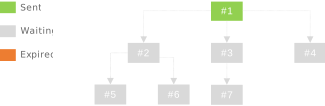
- #1: Initial email sent
- #2: If #1 is opened (no delay or immediate)
- #3: If #1 is not opened (after 1 day)
- #4: If #1 is opened but not responded to (after 1 day)
- #5, #6, #7: Various follow-ups for #2 or #3
When building each event in the sequence editor, you pick:
- Event (the “parent” email to watch for, e.g., #1)
- Delay (days/hours after the parent event)
- Condition (opened, not opened, responded, not responded, etc.)
Tip: When creating sequences, it’s recommended to enter action-based events first (e.g., opened, responded), followed by inaction-based events (e.g., not opened, not responded). This ensures your preferred actions are given higher priority when multiple conditions apply.
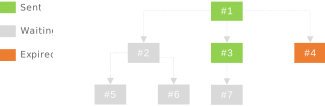
Example 1 – #1 Not Opened, Day 2
Day 2 arrives, and the recipient still hasn’t opened #1:
- #3 triggers because its condition is “#1 not opened after 1 day.”
- #4 is expired because it’s lower in order/priority than #3 for #1.
- #2 is still waiting for #1 to be opened; it cannot trigger yet.
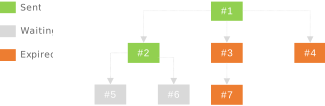
Example 2 – #1 Opened, Day 3
Continuing the same sequence:
- Day 3: The recipient has opened #1. This instantly satisfies the “opened” condition for #2 – a higher-priority event tied to #1.
- Because #2 now triggers, any lower-priority events tied to #1 (like #3 and its children) are marked expired.
In other words, once a higher-priority event (#2) is fired for #1, any lower priority events tied to #1 are expired.
Note: In this case, the recipient must have opened #1 slightly before Day 3. If the open had occurred later in the day, #7 (which depends on #3) may have also triggered before expiring.
Why Events Expire
Two main reasons cause an event to expire:
- A higher-priority event triggers first. If multiple events watch for #1 with different conditions, the first valid event to fire “wins” and lower-priority events on that same parent become expired. Any higher order events tied to the same parent remain waiting until they expire.
- An action invalidates the condition. For instance, if an event requires “not opened,” but the user then opens #1, the event’s condition is no longer true and it expires.
Sequence Editor View
In LeadSwift, you define each Event (#2, #3, etc.) by:
- Selecting the Event/Parent (e.g., #1)
- Specifying the delay (e.g., “1 day after #1”)
- Choosing the condition (opened, not opened, responded, etc.)
LeadSwift then automatically handles waiting times, triggers, and expiration of any conflicting or lower-priority events.