How can I schedule emails?
LeadSwift allows you to control when your emails are sent by setting a schedule. You can choose specific days, hours, or even an exact date and time for delivery.
How to Schedule Emails
When starting your outreach, you’ll see a modal where you can select a template or sequence, or write a custom email. At the bottom of this modal, you’ll see a toggle for scheduling:

Enable the “Schedule Date & Time” toggle to view available options:
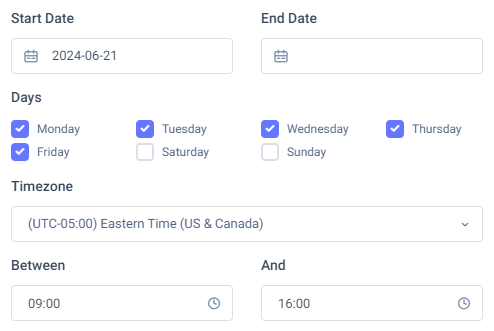
You can now choose the specific days, hours, and dates when emails should be sent.
Adjusting Schedules After Sending
After your outreach begins, you can still update the schedule:
- Go to the Campaigns tab in your Email History.
- Click the number under Scheduled Emails.
- From there, adjust the schedule settings as needed.
Note:
- Scheduling limits the number of emails that can be sent during a day. For example, if you allow emails only between 9:00 AM and 4:00 PM, only 8 emails can go out per day (1 per hour) instead of 24.
- Since emails are read asynchronously, limiting email sending times is often unnecessary and may reduce performance.