
How can I split-test campaigns?
LeadSwift allows you to A/B split-test campaigns by rotating multiple templates or sequences across your outreach. This helps you compare variations and optimize your results.
How to A/B Split-Test
- Create a separate template or sequence for each variation you want to test.
- When starting your outreach, select multiple templates or sequences to rotate between them:
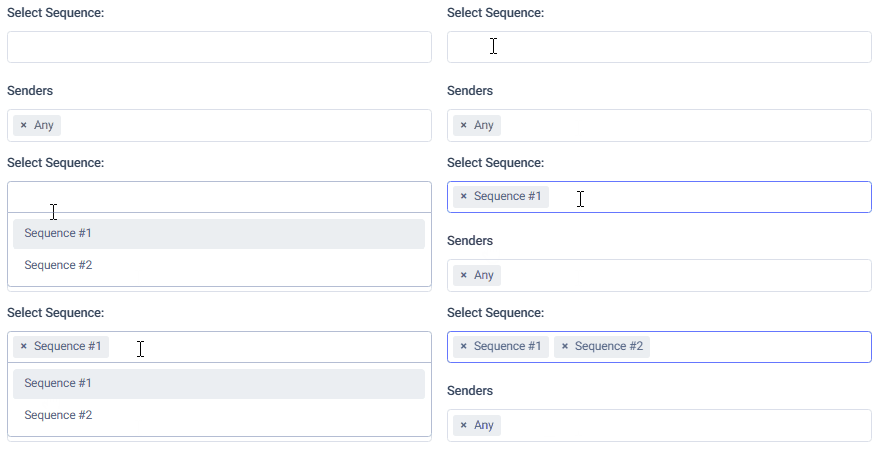
LeadSwift will automatically rotate the selected variations when queueing them.
Reviewing Performance
- Go to the Overview tab in the Email History page.
- Use the filters to view results for specific campaigns or variations.
- You can pause underperforming campaigns from the Campaigns tab.
Keep in mind: pausing a campaign will stop it from sending, but leads in that campaign are still marked as contacted. To retry them, you’ll need to filter out contacted leads and restart outreach to the rest.
Recommended Strategy
Rather than testing across all leads at once, split your leads into batches. For example:
- Send Variation A to the first 100 leads
- Send Variation B to the next 100
After reviewing results, you can continue outreach to the remaining leads using the better-performing variation—or run further tests with new batches.
Testing different versions of a sequence email (A/Z testing)
You can write several versions of any email in a sequence and let LeadSwift split your leads between them, so you can see which subject line or message gets more replies.
To use:
1. Go to Outreach › Sequences and open a step in the sequence builder
2. The email you have already written is version A. Under "A/Z testing", press "Add version"
3. Edit the new version's subject and body. It starts as a copy of your current email, so you only need to change what you want to test
4. Add more versions if you like (up to 26, A to Z), then save the step and the sequence
Leads are split evenly across the versions. Each lead always receives the same version of that step, even if the campaign is re-queued or you edit the sequence later.
Important: Change one thing at a time, such as just the subject line, so you know what made the difference. A version left with an empty body is removed when you save.
Reading the results
Open the sequence's analytics (see "How can I analyze my sequences?"). Steps with more than one version show a row for each version, with its own sent, opened, clicked and replied numbers. The version with the best reply rate is highlighted.
Give a test enough sends before deciding. A difference of one or two replies on a small number of emails is usually just chance.